How to Top-Up Your Allingo Balance
Effective logistics management requires a consistent and clear financial process to avoid disruptions. To start shipping smarter with Allingo, businesses must prepare their accounts to handle transactions swiftly and securely. Before sending your first order, make sure your account has available credit. This detailed tutorial explains exactly how to top-up and pay for deliveries, while also outlining alternative billing structures designed to support different operational needs. Start your journey to faster, cheaper, and more reliable deliveries by mastering these financial tools.
Comprehensive Payment Structures
While adding funds to the digital wallet remains a standard method for managing shipping expenses, the platform offers different financial workflows. Beyond the basic top-up feature, users can utilize several alternative payment methods to match their specific accounting practices.
- Cash Method: For organizations that prefer traditional financial tracking, operations can be managed using direct cash payment methods for certain transactions. This provides a tangible way to monitor daily logistics expenses.
- Post-Paid Accounts: Businesses processing a high volume of shipments can apply for a post-paid account structure. This arrangement allows companies to receive invoices at the end of a specific period, such as a month, without requiring upfront payments.
- COD Integration (Coming Soon): The platform continually updates its financial ecosystem. In the future, users will have the opportunity to use their collected Cash on Delivery (COD) funds to pay for delivery fees directly.
Step-by-Step Tutorial: How to Top-Up Your Balance
Maintaining adequate funds is essential for continuous shipping operations. Top-Up Your Balance & Stay in Control of Your Credit by following these precise instructions.
Step 1: Accessing the Dashboard Menu
- Log into the Portal: To begin the financial process, users must first log into the main business portal at business.allingo.vn. Establishing a secure connection is the first requirement for any account modification.
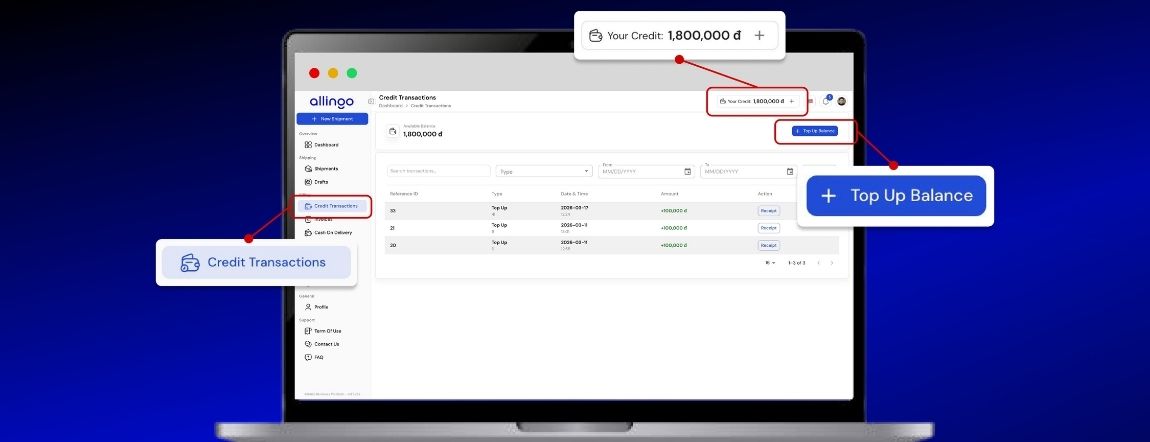
- Locate the Top-Up Section: Once successfully logged in, you can top-up anytime from your dashboard. Simply locate the Top Bar Balance, or Credit Transactions (Left Menu) to proceed.
- Initiate the Transaction: After finding the correct menu, click the "+ Top Up Balance" button. This action will open the main payment gateway interface.

Step 2: Choosing the Deposit Amount
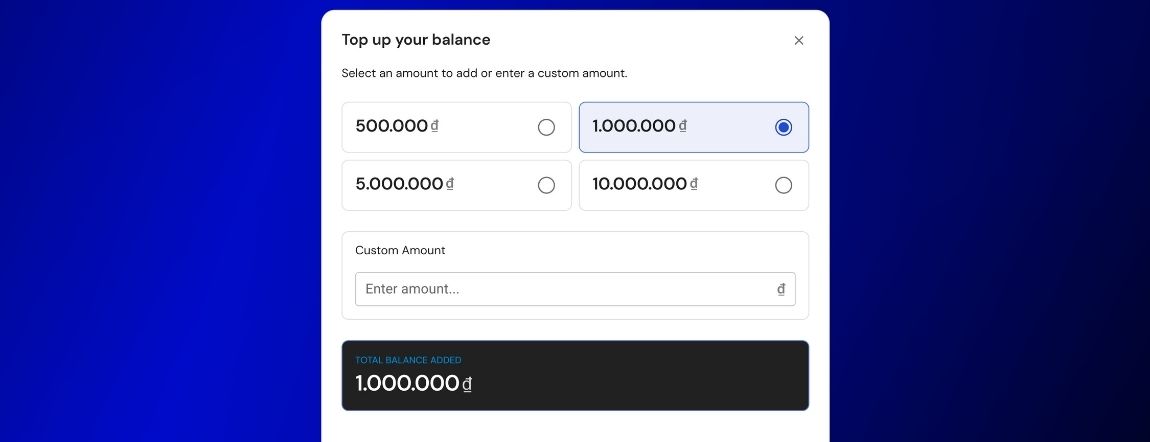
The platform provides flexible funding options to match different business requirements. The system prompts the user to select an amount to add or enter a custom amount based on their current shipping volume.
- Select a Pre-Set Tier: For general convenience, standard pre-set choices include 500.000 ₫ and 1.000.000 ₫. For larger operations, higher options like 5.000.000 ₫ and 10.000.000 ₫ are readily available.
- Input a Specific Budget: Users can utilize the Custom Amount field and enter the desired value to match their specific financial plans.
Step 3: Selecting a Payment Method
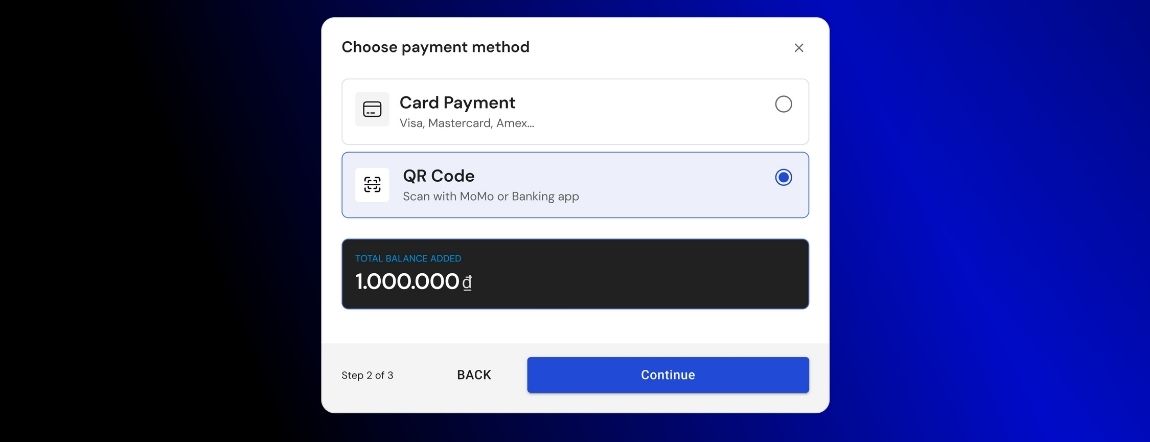
Ensuring secure and rapid financial transfers is a priority for the system. Allingo supports two easy ways to top-up, giving users the freedom to choose their preferred banking channel.
- Use the Card Payment Option: The first available option is Card Payment. This secure method supports major global financial networks, specifically Visa, Mastercard, Amex....
- Use the QR Code Option: The second available option is the modern QR Code method. This feature allows users to scan with MoMo or Banking app, creating a transaction process that is fast, secure, and ready in seconds.
Step 4: Confirming the Transaction
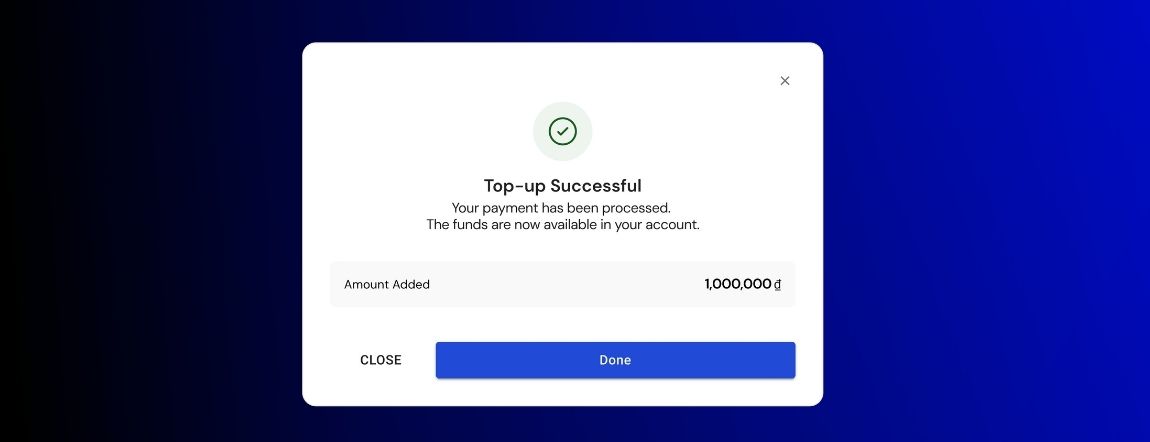
- Verify the Success Message: After authorizing the transfer through your bank, the system updates the financial status immediately. A confirmation window will display "Top-up Successful".
- Check Account Availability: The platform confirms that your payment has been processed and clearly states that the funds are now available in your account.
Consequently, your balance will be used to pay for shipment orders. The system offers operational flexibility, allowing you to top-up before sending orders or top-up after choosing your delivery option.